The core experience of Launch is experimenting with different job inputs such as hyperparameters and datasets, and routing these jobs to appropriate hardware. After you create a job, users beyond the original author can adjust these inputs through the W&B UI or CLI. For information about how to set job inputs when launching from the CLI or UI, see the Enqueue jobs guide. This guide describes how to programmatically control which inputs you can adjust for a job, so that you expose only the parameters you want end users to change. By default, W&B jobs capture the entireDocumentation Index
Fetch the complete documentation index at: https://wb-21fd5541-style-guide-support-models-articles-20260527-00.mintlify.app/llms.txt
Use this file to discover all available pages before exploring further.
Run.config as the inputs to a job, but the Launch SDK provides a function to control select keys in the run config or to specify JSON or YAML files as inputs.
Launch SDK functions require
wandb-core. For more information, see the wandb-core README.Reconfigure the Run object
By default, you can reconfigure the Run object returned by wandb.init() in a job. Use the Launch SDK to customize which parts of the Run.config object you can reconfigure when launching the job, so that you can hide internal settings while exposing the parameters that matter to end users.
launch.manage_wandb_config() configures the job to accept input values for the Run.config object. The optional include and exclude options take path prefixes within the nested config object. This is useful if, for example, a job uses a library whose options you don’t want to expose to end users.
If you provide include prefixes, only paths within the config that match an include prefix accept input values. If you provide exclude prefixes, paths that match the exclude list are filtered out of the input values. If a path matches both an include and an exclude prefix, the exclude prefix takes precedence.
In the preceding example, the path ["trainer.private"] filters out the private key from the trainer object, and the path ["trainer"] filters out all keys not under the trainer object.
Use a
\-escaped . to filter out keys with a . in their name.For example, r"trainer\.private" filters out the trainer.private key rather than the private key under the trainer object.The r prefix in the preceding example denotes a raw string.trainer parameters.
Access run config inputs
Jobs launched with run config inputs can access the input values through theRun.config. The Run returned by wandb.init() in the job code has the input values automatically set. To load the run config input values anywhere in the job code, use launch.load_wandb_config():
Reconfigure a file
The Launch SDK can also manage input values stored in config files in the job code. This is a common pattern in many deep learning and large language model use cases, such as this torchtune example or this Axolotl config.Sweeps on Launch does not support the use of config file inputs as sweep parameters. Sweep parameters must be controlled through the
Run.config object.launch.manage_config_file() function to add a config file as an input to the Launch job, giving you access to edit values within the config file when launching the job.
By default, no run config inputs are captured if you use launch.manage_config_file(). Calling launch.manage_wandb_config() overrides this behavior.
Consider the following example:
config.yaml:
launch.manage_config_file() adds the config.yaml file as an input to the job, making it reconfigurable when launching from the W&B CLI or UI.
Use the include and exclude keyword arguments to filter the acceptable input keys for the config file in the same way as launch.manage_wandb_config().
Access config file inputs
When you calllaunch.manage_config_file() in a run created by Launch, launch patches the contents of the config file with the input values. The patched config file is available in the job environment.
Customize a job’s launch drawer UI
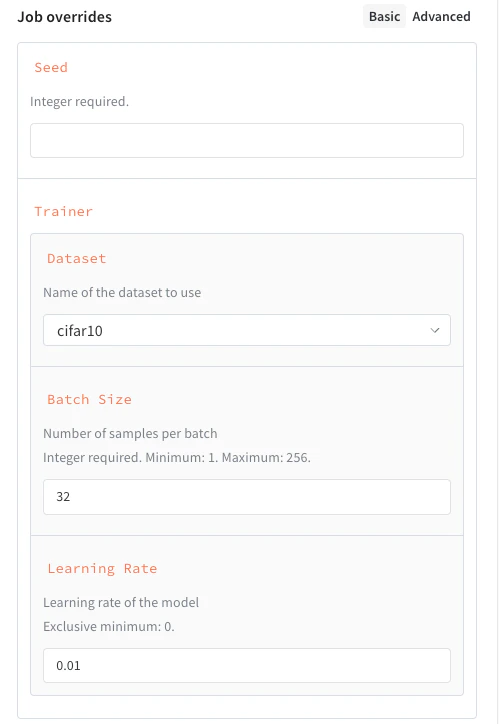
Beyond filtering which inputs you expose, you can define a schema for a job’s inputs to create a custom UI for launching the job. This presents structured fields, validation hints, and dropdowns in the launch drawer instead of freeform text entry. To define a job’s schema, include it in the call tolaunch.manage_wandb_config() or launch.manage_config_file(). The schema can be either a Python dict in the form of a JSON Schema or a Pydantic model class.
- JSON schema
- Pydantic model
The following example shows a schema with these properties:In general, the following JSON Schema attributes are supported:
seed, an integer.trainer, a dictionary with some keys specified:trainer.learning_rate, a float that must be greater than zero.trainer.batch_size, an integer that must be either 16, 64, or 256.trainer.dataset, a string that must be eithercifar10orcifar100.
| Attribute | Required | Notes |
|---|---|---|
type | Yes | Must be one of number, integer, string, or object |
title | No | Overrides the property’s display name |
description | No | Gives the property helper text |
enum | No | Creates a dropdown select instead of a freeform text entry |
minimum | No | Allowed only if type is number or integer |
maximum | No | Allowed only if type is number or integer |
exclusiveMinimum | No | Allowed only if type is number or integer |
exclusiveMaximum | No | Allowed only if type is number or integer |
properties | No | If type is object, defines nested configurations |